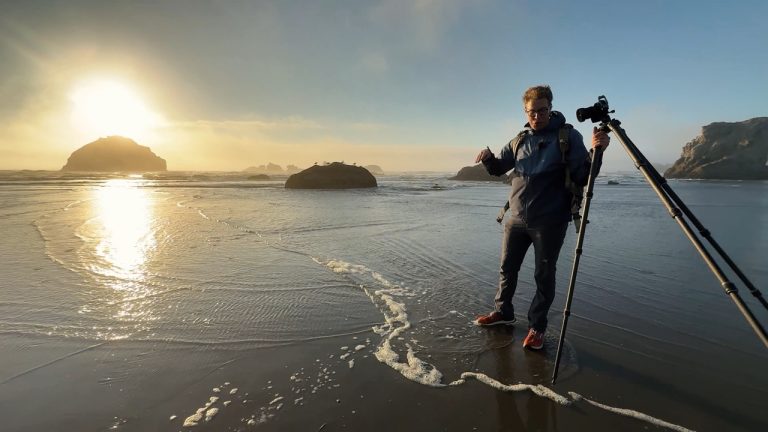
Capture stunning coastal images with professional outdoor photographer David Johnston as he takes you along Oregon’s breathtaking coastline to reveal the techniques behind successful seascape photography.
From unpredictable weather and changing tides to challenging coastal environments, seascape photography requires careful planning and the ability to adapt. In this course, David shows you how to anticipate conditions, identify promising photo opportunities, and make informed decisions behind the camera.
You'll learn how to interpret weather forecasts, understand tidal patterns, and plan your shoots around the conditions most likely to produce compelling images. David also shares practical techniques for approaching coastal scenes, choosing your shots, and navigating the unique challenges of photographing near the ocean.
Whether you're photographing dramatic waves or peaceful shorelines, you'll gain the skills and confidence to plan smarter, shoot more effectively, and capture memorable seascapes.
Join professional outdoor photographer David Johnston along Oregon’s breathtaking coastline as he shares his approach to capturing stunning seascapes. Discover how to plan your shoots around changing weather and tides, navigate challenging coastal conditions, and use practical photography techniques to capture dramatic, memorable images with confidence.
Learn how to plan a successful seascape photography shoot by researching locations and evaluating local weather conditions. Discover how high and low tides affect coastal landscapes and how to use tide information to choose the best time and location for capturing stunning seascape images.
Discover why scouting a location in person is an essential step in successful seascape photography. Learn how to identify promising compositions and photographic opportunities before setting up your camera, so you can approach your shoot with confidence, minimize guesswork, and capture stronger images.
Learn how to create compelling seascape compositions using a wide-angle lens, even when lighting conditions or camera equipment aren't ideal. Discover how switching between horizontal and vertical orientations, adjusting your shooting angle, and changing your perspective can improve the placement of rocks and other coastal elements to create stronger, more dynamic images.
Learn how to compose striking seascape images with a telephoto lens by choosing aspect ratios that best showcase distant coastal features. Discover how to anticipate your final crop while shooting, use in-camera cropping options when available, and refine your composition during post-processing to eliminate distractions and emphasize your subject.
Learn how to capture dynamic seascapes by adjusting your camera settings to balance changing light and moving water. Discover how to use faster shutter speeds to freeze crashing waves or longer exposures to create smooth, flowing water, while adjusting aperture and ISO to maintain proper exposure. Practice timing your shots with incoming and receding waves to capture compelling movement and texture in your coastal images.
Discover how to use natural light and weather conditions to create stunning seascape photographs. Explore how to time your shoots around sunrise and sunset, position coastal features to take advantage of warm golden-hour light, and use overcast skies, storm clouds, and atmospheric conditions to capture dramatic, moody scenes. You'll also discover how changing light can enhance both color and black-and-white seascape photography.
Join David as he walks you step by step through setting up a seascape shot, bringing together everything covered throughout the course. Follow along as he evaluates the location, chooses a composition, adjusts camera settings, and works with available light and water movement to capture the final image. See how each decision contributes to a successful seascape photograph and gain the confidence to apply the same process to your own shoots.
Join David as he walks you through his process for selecting and editing your best seascape photographs in Adobe Lightroom. Discover how to rate and organize your images, develop an editing plan, and make targeted adjustments to exposure, contrast, highlights, shadows, clarity, and color. Follow along as David transforms a coastal photograph into a polished final image that captures the beauty and drama of the scene.
David Johnston
David Johnston is a professional outdoor photographer located in the beautiful state of Tennessee. He is most familiar with photographing older mountain landscapes of the Appalachian Mountains, and occasionally ventures into other locations around the world to capture amazing outdoor scenes. David began his passion of photography in high school where he learned to photograph with film cameras and develop his own prints in the darkroom. However, after college he switched to digital photography and began his business photographing the outdoors as well as teaching people how to improve their skills in outdoor photography. When David isn’t traveling and taking photos, he’s just like you! He enjoys lounging on the couch, watching sports, and spending time with his wife and friends.

Bonus Materials available for download after purchase.
How do I know what the Class covers?
Every Class has a free Preview video you can watch, to give you a flavor of the Instructor and the skills or project that will be covered. In addition, the Overview tab includes a thorough written description of the Class. And finally, each Class Session has a brief written summary of the content in that Session, including the length of each Session video. You will get a good feel for the Class content by reviewing these resources.
Do I have to be a Member of Outdoor Photography Guide to purchase a Class?
No you don’t. While Premium Members will receive regular offers for special deals on OPG Academy content, Classes are not reserved exclusively for Members. If you buy a Class as a non-member, we’re sure you’d also enjoy having access to our full library of great photography videos and articles as a Member, so give it a try.
How do I purchase a Class?
First you should decide that the Class is what you want. Review the Class Preview video and the various written descriptions of the Class and each Session before you purchase, so you have a good understanding of the Class content. When you’re ready to purchase and gain access to the Class, simply click the “Add to Cart” button, and proceed through the Checkout process.
How do I access/view my Class?
Once you’ve paid, you can access/view your Class by going to the MY ACCOUNT section of Outdoor Photography Guide. The MY ACCOUNT link is in the upper right-hand area of the website. Within your MY ACCOUNT, a section labeled “My Content” is where the class you purchased will appear, including a link to watch the video of your Class. You’ll also receive an email confirmation after your purchase, which will include a link to view your Class. You can access your Class as many times as you wish, and you’ll never lose access to your Account information. Just be sure to “Log In” for access to MY ACCOUNT.
Do I have to take the Class right away?
No. Any Class you buy will be accessible to you always. You can view your Class whenever you want, and you can view individual Sessions in whatever order you like.
Is there a limit on the times I can view my Class?
No. Your access never expires. You can view any Class you purchase as many times as you want, whenever you want.
Can I view a Class on my tablet device or mobile phone?
No problem. Most newer-model smartphones or other mobile/tablet devices with an internet connection are able to play the Class videos. Simply Log In on Outdoor Photography, and you can view any Class you’ve bought through the MY ACCOUNT section. Or, you can click on the “View Class” link within the email confirmation you’ll receive upon your purchase.
How do I get access to the Bonus Materials for the Class?
Until you purchase a Class, the Bonus material (any extra videos, download materials, etc.) will not be accessible. Once you purchase a Class, and go to view your Class, each individual Bonus element is accessible by simply clicking on each item. You’ll find the Bonus Materials directly below your main Class viewer frame. You can access the bonus materials as many times as you like and/or save them to your device.
How does the Class Q&A Resource benefit work?
Once you purchase any Class, within the Class viewing page, you’ll have access to post a question, comment or tip in the Class Discussions. This is not a “live chat,” but your Class Instructor and OPG contributors will answer posted questions and provide tips regularly. You can also view other Class participants’ questions and input to take part in this virtual dialogue among others who have taken the Class and are willing to share tips, answers, or ideas.
Can I print out Class details?
For any Bonus Material that is a PDF Download, yes you can. Just click on the icon/button for the Bonus element you want, and print with your local printer.
What are PDF downloads?
These are simply documents, plans, or written materials that are formatted in a way to print out and retain for reference. By simply clicking on the icon/link for any PDF Download that is included with a Class, you can print that document on your own printer or simply view the contents on your computer/mobile device.
Are there any system requirements to view the Class video content?
Your Class video content is best when viewed on a computer manufactured in the past couple of years with a good broadband Internet connection (not dialup). We also highly recommend using the latest version of Firefox, Safari, or Chrome as your Internet Browser, though recent versions of Internet Explorer will work as well. The recommended screen resolution is 1024 x 768 or larger.
Why do you need my email?
We need it to acknowledge your purchase of a Class, and send you a confirmation of your transaction. Also, in order to maintain your permanent access to the Class videos, you’ll need to Log In to outdoorphotographyguide.com. We guarantee that we will not share your email with any third parties. You may receive email updates from OPG from time to time, with details of new Classes and updates. You can easily unsubscribe when you receive any email.
Can I get a refund if I don’t like the Class?
Because you’ll have full access to all the materials and content that is presented in the Class immediately, we can’t offer a refund after purchase. Please review the Class Preview video and the various written descriptions of the Class and each Session before you purchase, so you have a good understanding of the Class content.
How do I contact OPG Academy?
If your question is about the Class content, please use the Contact Us Link – and you'll receive feedback from the Class Instructor. Even your fellow Class participants may jump in to offer tips and advice from their experience. If you have other questions or need help, you can email us at OPGsubscription@program-director.net or call us toll-free, at 1-855-231-0652. Service Representatives will be available Monday-Friday, from 8:00 AM to 4:30 PM Central time, excluding normal holidays.
Explore Classes by David Johnston


You may be interested in


Sign up for our free newsletter today
Get the latest outdoor photography videos, tips and techniques delivered right to your inbox.